
AliExpress buyer guide · Mobile app
How to request a return and refund on AliExpress
Check your order status first. For either process, tap Account, go to My orders and select View all.
Item received
Request a return and refund
Open the order for the item you want to return. The name of the return option may vary by app version and order status.
-
Open your order
From your order list, open the order details and tap Return/refunds.
-
Complete and submit your request
Select the item and the reason for returning it, then choose the return-and-refund option if offered. If the app asks for evidence, upload photos of the item or packaging that show the issue. Review your request and submit it.
-
Follow the return instructions
Wait for the return instructions in your request. Use the label, address and shipping method shown, and send the package by the displayed deadline. Keep your proof of postage and enter the tracking number if prompted.
-
Track your return and refund
Reopen the return and refund details for the same order. Check whether more information is needed, follow your return and refund status, and see where the refund will be sent.
Order not yet shipped
Cancel your order
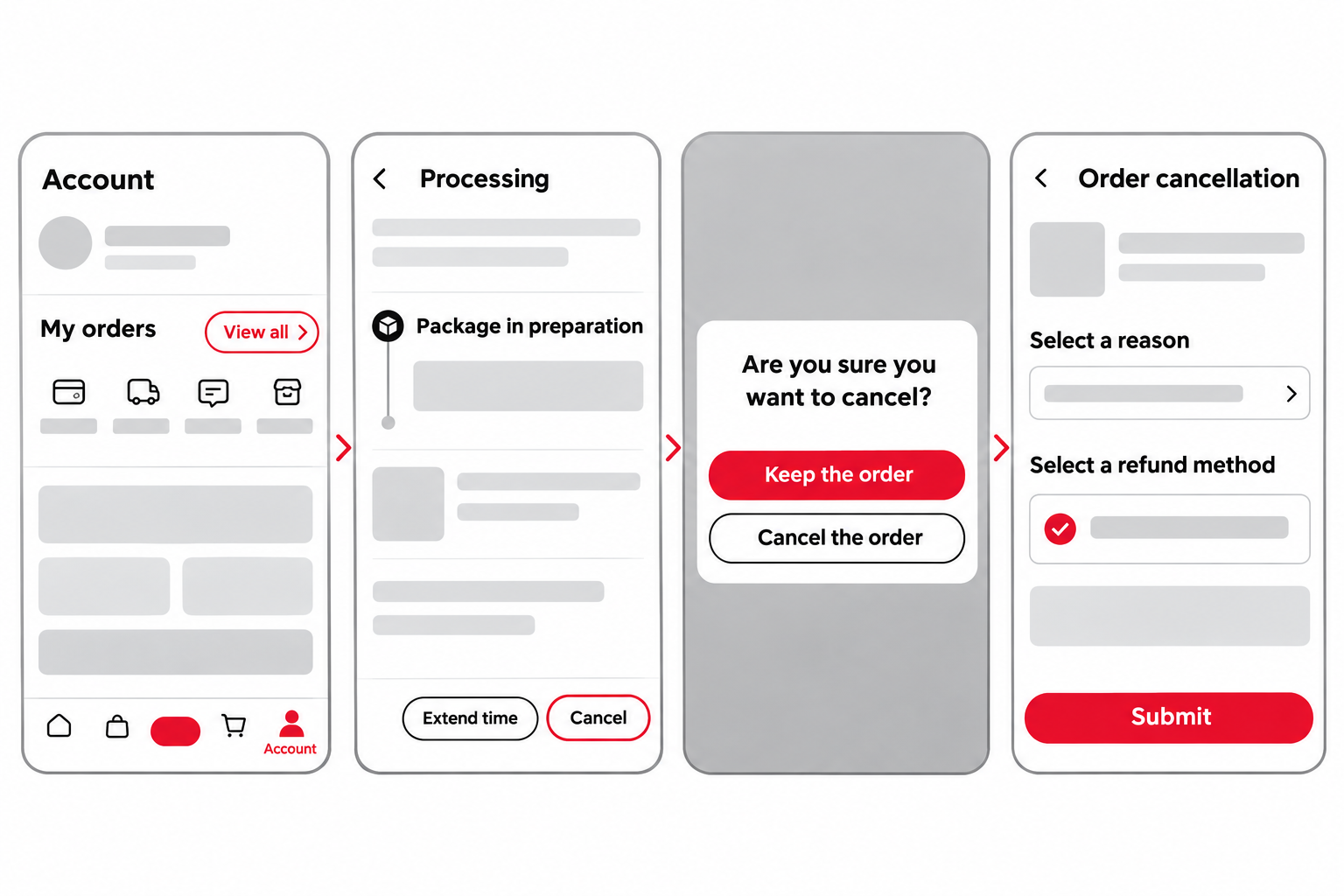
Use these steps if your order shows Processing and the order details include a Cancel button.
-
Open your order list
Tap Account at the bottom right, then View all in My orders.
-
Open the order and tap Cancel
Open the order you want to cancel. Check that it is still being prepared and tap Cancel at the bottom of the order details.
-
Confirm in the pop-up
Tap Cancel the order to continue. To keep your order, tap Keep the order.
-
Choose a reason and refund method
On the Order cancellation screen, select the reason that applies. Check the refund method, tap Submit and return to the order to check the cancellation and refund status.
If you can’t find the option
- Check that you’ve opened the right order. Review its status and the deadline to request a return or refund.
- If your package has shipped but hasn’t arrived, check tracking and the available options in the order details. Only confirm receipt if you actually received the parcel.
- If you still can’t find an option that applies, contact customer service in the app about that order.